For everyone
Transport Monitor and more news in AESA Core TMS
Transport Monitor: all of a company’s loadings and unloadings in one place. Plus transport conditions, exchange search tabs and more updates.
Published
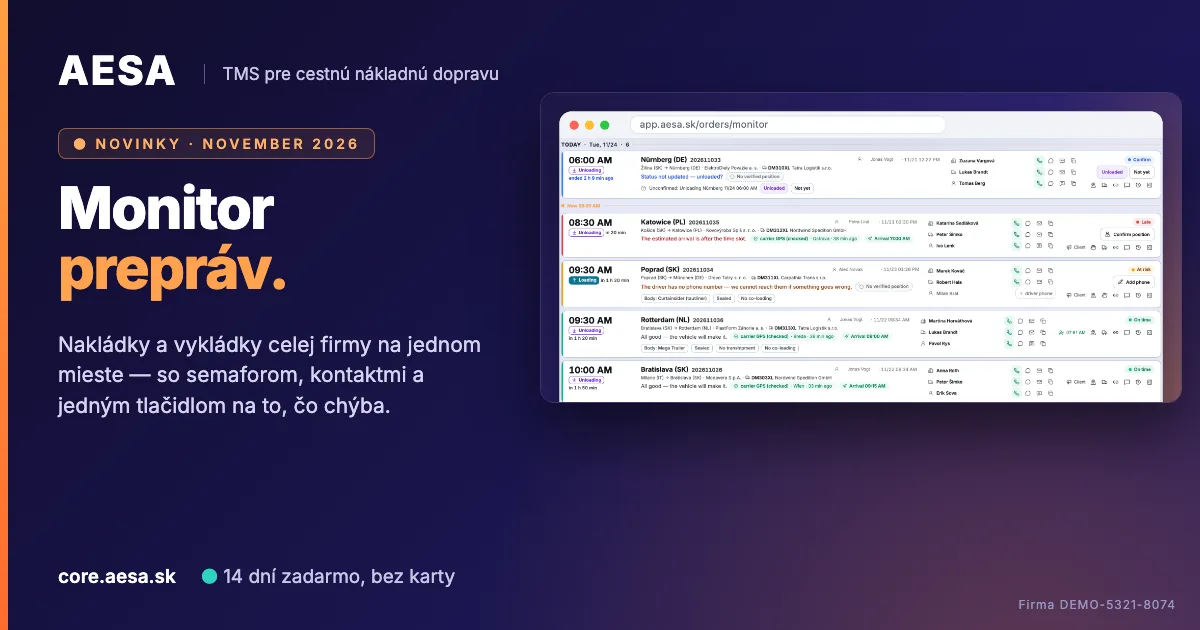
At the end of November AESA Core TMS gained the Transport Monitor: one place where you see all of your company’s next loadings and unloadings and know at once where to act. It comes with transport conditions in the order, search tabs on the exchange and a few smaller improvements. The guide at core.aesa.sk/howtouse is up to date.
Transport Monitor
- Everything that matters on one screen. In Orders → Monitor you see the loadings and unloadings of all open transports yesterday, today and tomorrow, manual ones and those with the AESA Drive app.
- A traffic light shows where to act. For each stop you see whether it is on time, at risk, or whether the vehicle position is missing. One button adds what is missing: the carrier, the plate or the driver’s phone.
- Contacts in one click. The customer, the carrier and the driver are right on the card. With Customer informed you note that the customer knows the status, and every step goes into the order History.
- Tomorrow a day ahead. A missing crew for tomorrow’s loading shows up today. The Dashboard has a Next stops tile.
- We keep developing the Monitor. We are switching on bell alerts step by step and preparing messages to the customer and a morning summary. The Monitor arrives in the AESA Transport app with the new version 1.1.
Transport conditions
- The carrier knows in advance what applies. In step 1 of a new order you fill in the body type, temperature, ADR, no co-loading or transhipment, the seal and what the site needs to know before loading. They are printed as binding on the carrier’s order.
- Customer defaults. Save them once in the customer card and every new order takes them over.
- An overview in the order detail. You see what is still missing. Only a colleague with permission sees the driver’s ID, and it is deleted 7 days after the transport. You record a breach of the conditions as evidence.
Exchange
- Search tabs. Above the Freight Exchange you have the Whole market tab and your own tabs via + New tab, for example “Nitra +50 km → DE”. Each one remembers its filters and shows the number of new offers. New offers appear on their own and the list does not jump.
- An internal note and a message to a colleague. Add a note to your own offer that nobody else on the exchange sees, and with Message colleague send the offer to their chat.
More improvements
- Business cases: AI fills in the company. Drop in a screenshot, photo, PDF or text about a company and AI fills in the name, address, VAT number and contact person. You check the highlighted fields and save.
- The carrier’s GPS link in one click. The Copy link button copies the actual address of the carrier’s GPS access.