Freight forwarding
After TMS sign-up: from company check to first order
What happens after a freight forwarder signs up for AESA Core TMS: company check within 24 hours, welcome e-mail, First steps card, 14 days free.
Published
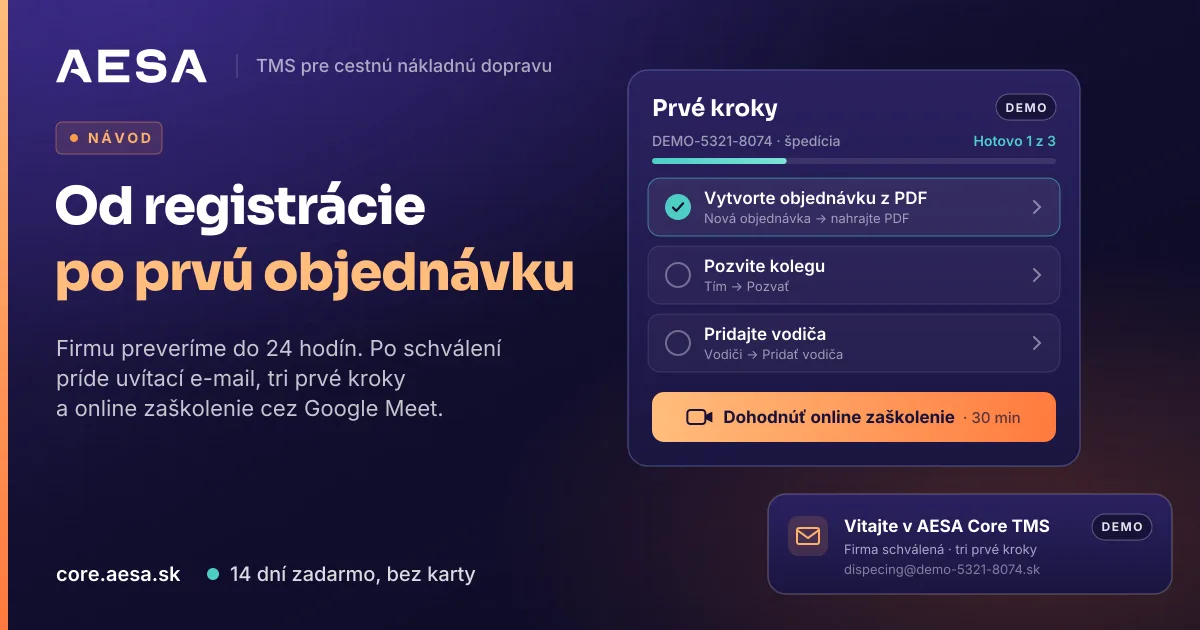
After you sign up, we verify your company within 24 hours, and right after approval you receive an e-mail with three first steps and an offer of an online onboarding. Your first order from a PDF can be in the system on the day of approval. Below is the whole path from sign-up to the first shipment in AESA Core TMS, the system for orders, carriers and drivers.
1. Company sign-up
You create a company account at app.aesa.sk. You enter your VAT number and we fill in the company details from the EU register (VIES); you just check them. You confirm your e-mail with a 6-digit code we send you.
During sign-up you can also upload a company document. A freight forwarder uploads its freight forwarder liability insurance. You can upload it right away or later.
2. Company verification within 24 hours
We verify every company on the platform within 24 hours, so there are no anonymous companies here. A person checks it. No company is approved automatically, not even one with a valid VAT number.
Until the verification is done, you cannot sign in. After approval you receive an e-mail and you can sign in.
3. Welcome e-mail after approval
Right after approval, the company founder receives a welcome e-mail in their language. It contains:
- three first steps based on the company type, each with a button that opens the right place in the app,
- mobile apps: AESA Transport for the office and AESA Drive for drivers,
- the user guide, with every screen step by step, with pictures,
- an online onboarding via Google Meet: in 30 minutes we show you how to set up the app for your company and answer your questions,
- contact to your contact person by e-mail and phone.
4. 14 days free from approval
The trial lasts 14 days and starts with the approval of your company, not with sign-up. The verification time does not shorten it. You do not enter a payment card.
After the trial you pay €30 per month including the administrator account and €10 for each additional colleague. You do not pay for drivers. Details are in the AESA Core TMS pricing.
5. The First steps card on the Dashboard
After you sign in, the First steps card waits for you on the Dashboard. It has the same three steps as the e-mail and shows how many of them you have done, for example 1 of 3 done. A step is marked by itself once you do it in the app.
Below the steps is help for the start: contact to your contact person, a link to the User guide and the Book an online onboarding button. The card is shown for the first 30 days. When you no longer need it, hide it with the cross and bring it back via Edit board.
6. What to do on day one
For a freight forwarder the card has these three steps:
- Create an order from a PDF. Click the step and New order opens. Upload the PDF order from your customer and AI fills in the fields. You just check them. The whole process is described in the article Transport order from PDF.
- Invite a colleague. In Team, click Invite. Your colleague gets an e-mail and sees the company orders. Prices and margin are visible only to a colleague you give the right to.
- Add a driver. In Drivers, click Add driver. The driver downloads the AESA Drive app and enters a 6-digit code, valid for 6 hours. The driver then reports the shipment status from the phone, without a GPS unit.
How a driver connects to a shipment and reports its status is explained in the article AESA Transport and AESA Drive on App Store and Google Play.
7. Aesa shows you how
Every verified company also has the assistant Aesa in the app. When you are not sure where to find something, ask her and she shows you how.
Frequently asked questions
How long does company verification take?
We verify every company within 24 hours. After approval you receive an e-mail and can sign in.
When do the 14 free days start?
With the approval of your company. The days we spend on verification do not count towards the trial.
Do I have to enter a payment card?
No. You use the trial without a payment card.
How do I book an online onboarding?
With the button in the welcome e-mail or on the First steps card on the Dashboard. The onboarding takes 30 minutes via Google Meet.
Do I pay for drivers?
No. You do not pay for drivers; you connect a driver with one code in the AESA Drive app.
Where to find more
How a freight forwarder brings orders, carriers and drivers into one system is shown on the page freight forwarding software. Individual screens are in the step-by-step guide. What to ask when choosing a system is covered in the article How to choose a TMS for a freight forwarder.
Three steps are enough on day one: an order from a PDF, a colleague and a driver.
You can create a company account in a few minutes and try it for 14 days free, no payment card.