Freight forwarding
Transport order from PDF: AI fills it in, you confirm it
Enter a transport order from PDF without retyping. Upload a PDF or photo, AI fills in the customer, stops, goods and prices, and you check and save the order.
Published
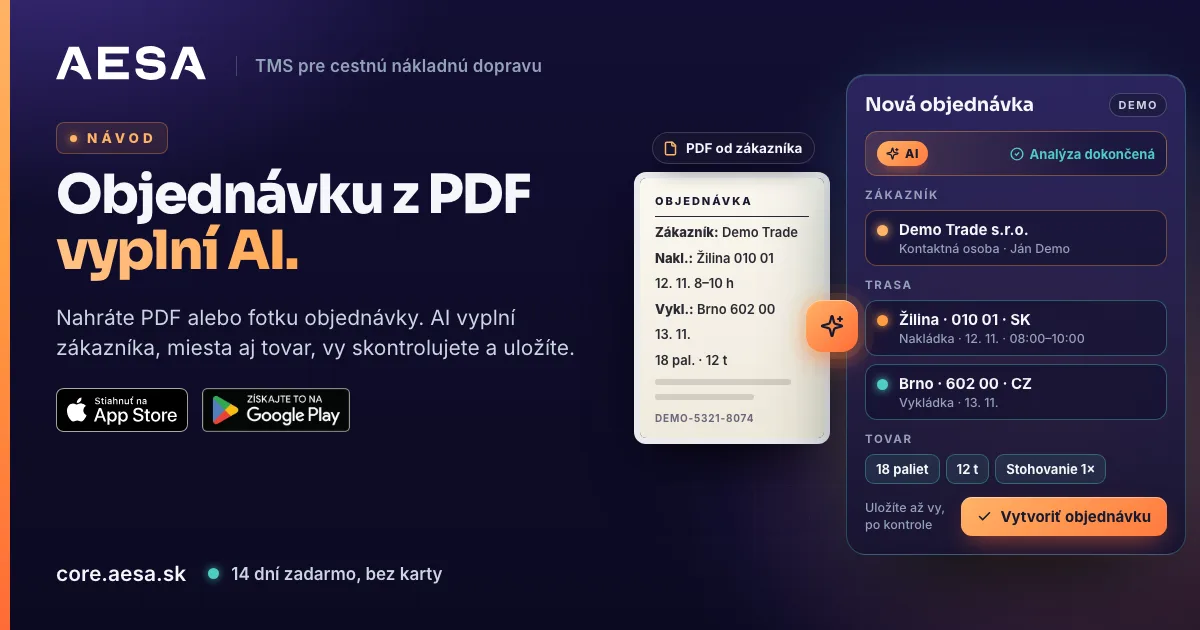
You do not need to retype a transport order from PDF: in AESA Core TMS, the system for orders, carriers and drivers, you upload it to the wizard and AI fills in the customer, loading and unloading places, goods and prices. You check the data and save the order. The transport order then goes to the carrier, and the driver reports the shipment status.
Can a transport order be read from a PDF automatically?
Yes. In the new order wizard you upload a PDF or an image of the order, and AI fills in the form fields. It works with PDF, JPG, PNG and WEBP files, for example a phone photo of a paper order. AI order entry is part of the wizard, not a separate tool.
Why retyping orders leads to errors
A customer's order is usually one or two pages long. It holds addresses, dates, time windows, reference numbers, weights and instructions for the driver. When you retype it field by field, it is easy to swap a postcode, skip a reference or mix up the loading and unloading dates.
AI order entry for freight forwarders changes the order of work. AI writes the data into the fields and the dispatcher checks them. Checking a finished form is different work from writing from scratch: you see the whole order at once and look only for what does not fit.
How to enter a transport order from PDF, step by step
- In the menu open Orders and click New Order above the table on the right. A wizard opens with three steps: Customer Details, Cargo and Route, Carrier and Summary.
- The first step has the Upload Order (PDF/Image) area. Click it or drag the file onto it.
- Wait while AI processes the document. You see the progress and can cancel the processing.
- After the message Analysis complete, go through the first step: the customer, the contact person and the customer price.
- Click Next to open Cargo and Route and check the loading and unloading places, dates and goods.
- In Carrier and Summary, pick the carrier, enter the carrier price and decide whether to track the shipment in the AESA Drive app.
- Click Create Order.
The detailed guide is in the manual: new order step by step.
What AI fills in and how it handles the customer
- The customer. If the customer is already in your directory, the system finds it by VAT number, otherwise by name. It completes only empty fields and overwrites nothing.
- A new customer. It is created automatically only when it has every required field of the customer card. If something is missing, a pre-filled form opens and shows what to add.
- The contact person. If the document has none, the wizard picks the main contact from the customer card and tells you so.
- Loading and unloading places. Company, street, city, postcode, country and date.
- Goods. Description, quantity, weight and reference numbers.
- Prices. The amount and currency from the customer's order.
Fields filled in by AI are briefly highlighted in the wizard, so you know where to look.
What stays with you
AI never saves or sends an order on its own. You go through the wizard steps, and when you move on, the system checks the required fields. It marks missing ones in red, and the order is not saved without them. You choose the carrier, its price and tracking.
Is AI order processing safe?
Yes, with clear rules. We process data in the EU. Prices and margin are visible only to colleagues you give the permission to. AI only extracts data from the document into the form fields; you decide about the order. Personal data protection is governed by the GDPR, and the use of AI in the EU by Regulation (EU) 2024/1689, the AI Act.
What comes next: the transport order and status from the driver
A saved order is also the transport order. In the order list, click the envelope icon on the row and the transport order goes to the carrier as a PDF by e-mail in the carrier's language.
The driver then reports the shipment status from a phone, without a GPS unit. Your carrier does not have to register: the driver enters a 6-digit code in the AESA Drive app and you still see the status. The code is valid for 6 hours.
Where transport is heading: electronic documents
The EU is moving towards electronic documents in freight transport. Regulation (EU) 2020/1056 on eFTI applies in full from 9 July 2027. From that day, authorities in all Member States must accept transport information in electronic form from certified platforms. An order that lives in your system as data, not just as a scan, is a step in that direction.
Where to find more
See how freight forwarders combine orders, carriers and tracking on the page order management system for freight forwarders. How AI puts a load on the exchange from an e-mail or photo is explained in the article AI puts your load on the exchange. Prices are in the pricing: €30 per month, €10 for each additional colleague, and drivers are free.
You can set up a company account in a few minutes. Try it free for 14 days, no card required.
Sources
- Regulation (EU) 2020/1056 on electronic freight transport information (eFTI) — European Commission
- AI Act, Regulation (EU) 2024/1689 — European Commission
- Data protection in the EU (GDPR) — European Commission