Freight forwarding
Carrier GPS access stored right on the order
Store the carrier's vehicle tracking link on the order. No digging through e-mails, and only people you authorise can see the password.
Published
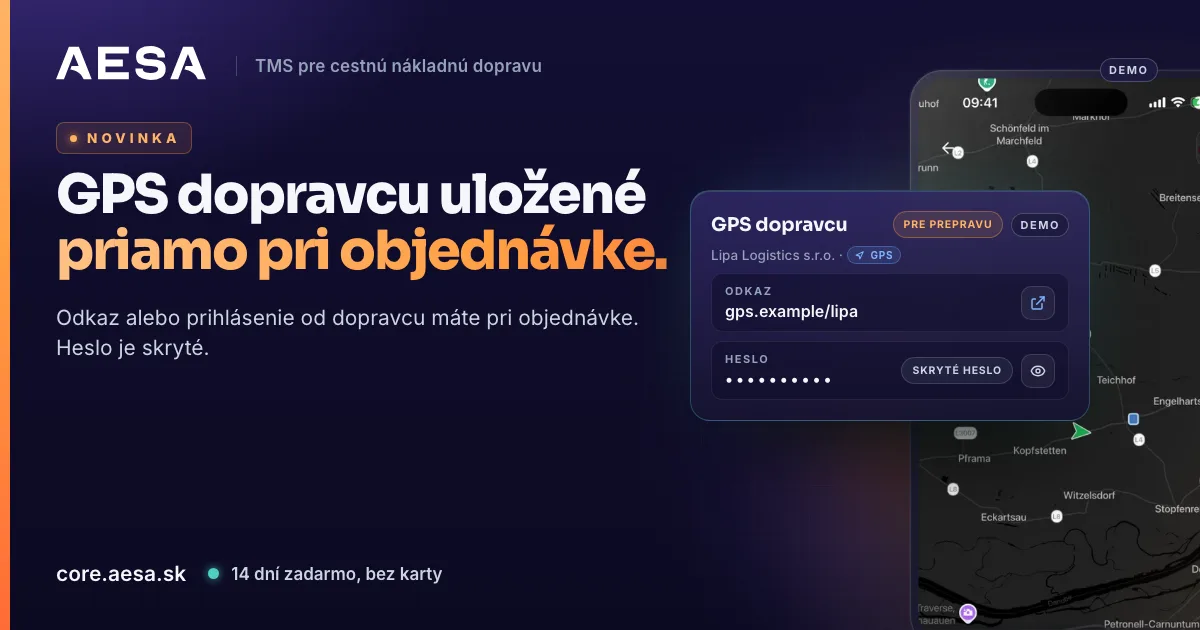
When a carrier sends you a link to track their truck, you store it on the order in AESA Core TMS, the system for orders, carriers and drivers. Next time you open it with one click. When a customer calls to ask where the truck is, you no longer search old e-mails for login details.
What changes
A carrier that does not use AESA Drive usually sends you a link to their GPS portal, or a username and password. That e-mail quickly disappears in the inbox. In TMS you now store it where you will look for it: on the order and on the carrier.
How to store access for a single transport
There are three places to do it:
- In the order detail. Open the order. On the Parties card you will find the + GPS button next to the carrier.
- In the ⋯ menu. In the order detail open the ⋯ menu and choose Carrier GPS.
- While creating the order. In a new order, the Carrier step has a section called Carrier GPS tracking (optional). Paste the link or login there and it is saved with the order.
The window New carrier GPS access opens. Choose the Type: Link or Login. For a login, fill in the GPS provider, username and password. You can add vehicle plates and a note. Then click Save access. The password is stored encrypted.
Validity: this transport only, or permanent
In the window you choose the Access validity:
- This transport only. We delete the username and password 7 days after unloading or after the order is marked Delivered. The link stays.
- Permanent (on the carrier). Useful when the carrier has given you one access for all shipments. You store it under Carriers, in the carrier's card, in the Vehicle tracking (GPS) section. You will see it on each of that carrier's orders.
How to see who has GPS
- In the order table, a blue GPS badge appears next to the carrier. You see at once which shipment has access.
- In the Carriers list you can switch on the With GPS access filter.
- You open the link with one click through Open GPS.
Who sees the password
The password is hidden by default. You reveal it with the eye button, and it hides again after 30 seconds. Every reveal is logged. A colleague with the right to manage access sees on it who last viewed the password and when. That keeps you in control when several colleagues work on the same orders.
The permission has three levels, and an administrator sets it under Team → Permissions:
- Carrier GPS – view. The colleague sees stored links and logins, but not the password.
- Carrier GPS – manage. They can add, edit and remove access.
- Carrier GPS – reveal password. They can display the password.
A colleague without the permission sees an explanation of what is missing and whom to ask, not an empty space.
What else you can set
You can enter how long the access is valid (Valid until), and on the access you see in how many days it expires. When you no longer need an access, remove it with Remove access. The stored password is then erased and cannot be recovered. With Edit access you can, for example, change the link or add another plate.
After the login is deleted at the end of a shipment, the link stays on the order together with a note that we deleted the login. Next time you know where the carrier was tracked, and you can ask them for new details if you need them.
Why this makes sense
- Less work. One source instead of searching e-mails.
- More time. A customer asks about the position, and you open the link in seconds.
- More order. You do not copy passwords out of e-mails, and single-transport logins delete themselves after the transport ends.
AESA Core TMS also gives you your own tracking link for the customer, which opens without a login. Carrier GPS is a complement for the cases where the carrier has its own GPS portal and you want to see the truck's position from it. To see how a freight forwarder brings orders, carriers and tracking together, visit AESA Core TMS for freight forwarders.
Try AESA Core TMS free for 14 days, no card needed. We verify every company within 24 hours, so there are no anonymous companies on the platform.